March 5, 2014 8:53 pm AEST
We are saddened to announce the end-of-life of the MetroTwit for Desktop and MetroTwit for Windows 8 apps effective immediately.
Due to the “access token limit” imposed by Twitter since August 2012, we are preemptively sunsetting MetroTwit due to technical limitations of Twitter’s API which may prevent existing users from accessing the app after the limit has been crossed.
Effective immediately, we will be removing the MetroTwit for Desktop installer and MetroTwit for Windows 8 Store listing to ensure the app remains usable by all current users.
If you’re a current MetroTwit user, we apologise for the inconvenience but don’t worry, the apps you love to use will continue to work. However, we will not be supporting the app or releasing any major new features and updates.
We’re extremely proud to have worked on MetroTwit and want to thank the over 400,000 Twitter users who used MetroTwit over the past 4 years and have helped shape and support it.
A very special thanks to our MetroTwit Loop beta group who have been our exceedingly enthusiastic supporters and have let us know both the good and bad about MetroTwit since our first beta version.
None of us could have ever imagined what a humble Photoshop mockup would become as popular and acclaimed as MetroTwit. Not without its challenges and struggles, we’re proud to have worked on this app and its many updates.
Once again, thank you all.
The MetroTwit team
David Golden, Winston Pang, Long Zheng
November 12, 2012 11:23 am AEST
In today’s release of the MetroTwit Loop beta, we have started our migration of our WPF codebase to Microsoft’s .NET 4.5 Framework, officially released just a month ago. This is a significant change bringing notable performance and memory improvements, however it drops support for Windows XP.
We would encourage everyone to download the new release and experience the snappier responsiveness for themselves but we also wanted to provide a behind-the-scenes peek at why this is now possible.
On Microsoft’s page highlighting the new features and enhancements to Windows Presentation Foundation 4.5, the most significant feature for MetroTwit for Desktop is the addition of a new list virtualization feature which we’ve been silently praying for since the early days of our project’s development.
As some of our heavy users would know, our app can display quite a number of tweets in the column lists. Previously, all of these tweets would be rendered and stored in memory, even if they are not visible – far off the page.
Virtualization is a platform rendering feature that attempts to solve the above issue by “hiding” the items of a list that is not currently visible (scrolled far off the list), and thus also saving memory. Previously, WPF restricted the use of virtualization to “item scrolling” which severely degraded the user experience which we chose not to sacrifice.
Now with WPF 4.5, virtualization is also available for “pixel scrolling” which delivers the smooth and familiar scrolling experience people expect, thus we are able to utilize it to its full advantage without compromise.
We hope this explanation provides some useful insight into our eager adoption of .NET 4.5 for MetroTwit for Desktop. We understand and appreciate that a number of our loyal users are still on Windows XP and we would encourage those users to upgrade their systems where possible.
We look forward to shipping numerous new features and performance enhancements to MetroTwit for Desktop over the coming weeks and months.
— David Golden, Winston Pang, Long Zheng
October 13, 2012 10:39 am AEST
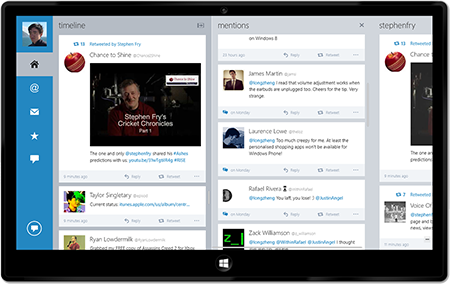
The anticipated major update to MetroTwit for Windows 8 has just been certified and is now rolling out to Windows 8 users around the world for customer download. You can see the details in the Windows Store here.
The significant new features added since our preview version are:
- Twitter Streaming support (and Twitter API 1.1 support)
- Added Twitter lists support
- Added multiple accounts support (requires MetroTwit Pro or Plus)
- Added inline media previews
- Added support for Twitter profile banners
- Fixed portrait and snap view support for many pages
- Fixed multiple crashes and instabilities
- Fixed emoji unicode support
- Added geolocation support
- Many new features
While it has taken us several months to prepare this update, we anticipate rolling out more features and bugfixes in the near future through the Windows Store.
Pricing: free upgrade for all current MetroTwit Plus users
MetroTwit Pro – the in-app upgrade removes the advertising inside MetroTwit for Windows 8 and also enables multiple-accounts support, and may include other professional features in the future. This is a $4.99 (AUD) in-app upgrade from the Windows Store.
Since we had very small beginnings with heartfelt support from many early adopters who paid for our Windows desktop application, we’d like to return the kindness with a special offer to all MetroTwit Plus users. Every MetroTwit Plus user gets free access to the Windows 8 app upgrade as well.
Simply copy and paste the MetroTwit Plus email code into the General Settings screen from the Settings charm to validate the upgrade.
Thank you all for your support
We would like to thank everyone for their patience and ongoing support of MetroTwit’s development. We are a very small team with big ambitions facing very harsh restrictions from Twitter, so seeing the overwhelmingly positive community response has been much appreciated. Please continue to rate and review our app.
We hope to also release a refreshing update to MetroTwit for Desktop soon.
— David Golden, Winston Pang, Long Zheng
December 16, 2011 3:41 pm AEST

Over the past few months, we’ve been running a private beta program with a small number of users to gather immediate and valuable feedback on new features and functionality changes as we develop them on a daily basis. This program was known as MetroTwit Loop.
Due to the extremely positive feedback we’ve received from our very helpful beta testers, we’re opening up the beta to everyone today.
If you’re technically adventurous, go download MetroTwit Loop today and look at all the things we’ve fixed since the last release. It can be installed side-by-side with the general MetroTwit release so if something breaks (as it might) you could always switch.
With any beta, the feedback users provide are invaluable to shape the future of the software so we have a dedicated Facebook group where anyone can report bugs and make suggestions.
We’ve squashed some nasty bugs thanks to the involvement of our beta users so we’re extremely grateful for everyone’s support and look forward to making MetroTwit the Twitter client for Windows you love even more.
October 16, 2011 11:56 pm AEST
When we found out a couple of months ago Santa Claus wasn’t real, we panicked. Our business model of making a kickass Windows app in anticipation for chimneys of wrapped gifts toppled like the Twitter API under a light breeze.
Working on MetroTwit is challenging, but in a good way. We like going the extra mile (in WPF land that’s usually 1.4 miles) to add the extra layers of polish to the app which not only our users seem to notice but also enjoy. Of course, this usually takes time, a lot of time.
The truth is, we’re introducing ads to MetroTwit because we want to spend more time working on MetroTwit, adding more features and polishing more pixels and squashing more bugs.
We chose 140proof as our advertising provider because they make ads more relevant and contextual for Twitter users. Based on our own trials, most of the ads seem to be targeted to our interests (I sometimes see Microsoft ads) and fresh with new content. We also like their simple privacy policy.
For users who just can’t stand ads, we’re also introducing MetroTwit Plus – a one-off upgrade to remove ads and future access to the planned multiple-accounts support for professional users.
We know it’s been a while since our last update but we hope you will appreciate all the stuff we’ve been working on in version 0.9 (coming tonight). We have much more planned to make Twitter an even better experience on Windows (and across Windows Phone with Nest) and we hope to share them soon.
Long Zheng, David Golden and Winston Pang.