Archive for the 'Announcements' Category

MetroTwit is looking for a C#/WPF/WinRT/*.* developer

We want to make the best Twitter client for Windows (and Windows 8 ) and we need help developing new features, fixing bugs and porting our application to Windows RunTime (WinRT).

For us and our users, it’s all about the pixels. We are looking for an enthusiastic C# developer with a keen eye for detail who can go the extra mile for that special pixel without compromise.

  • .NET 4 WPF experience (and tolerance for WPF) necessary
  • XAML experience necessary
  • Keen to learn new things – WinRT and .NET 4.5
  • User experience design skills favorable
  • Silverlight experience favorable

We are geographically diverse in Australia but welcome developers from all hemispheres and timezones as long you’re prepared to chat on IM and talk on Skype at odd hours of the day.

Since we’re just a small bootstrapped group with big ideas, we’re looking for a developer who can code for the love of the code, pixels and a profit-share from the project. Bonus baked treats are available from @winstonpang upon favorable performance.

Please send resume, samples of work and/or bribe money to [email protected].


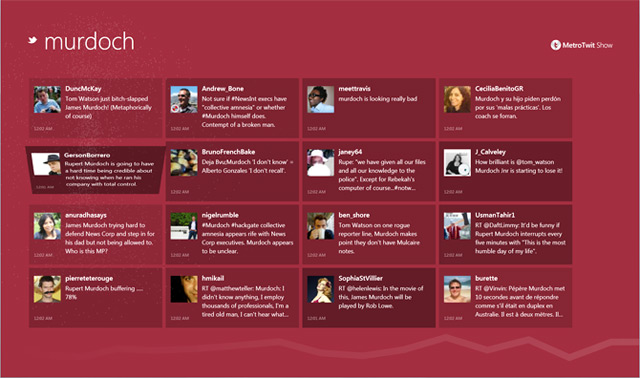
Introducing MetroTwit Show: a visualizer for Twitter

One of the many features we’ve been planning for MetroTwit since day one is the ability to visualize and enjoy tweets in a more casual and interactive format. Today, we’re making available MetroTwit Show, a project that’s been in the oven for a few weeks to make the reading experience for Twitter more vibrant.

To make the experience accessible, MetroTwit Show is a Silverlight 4 out-of-browser application to take advantage of the widespread adoption of Silverlight on both Windows and Macs. Like MetroTwit, it is inspired by Microsoft’s Metro design language and prides itself on beautiful animations and elegant typography.

As a v1 release, the feature set is limited to a simple read-only experience to following searches and trends. We have plans to add many more layers of interactivity and functionality.

As always, we look forward to everyone’s feedback on both MetroTwit Show and MetroTwit as we continue refining and improving the Twitter experience on Windows.


Announcing “The Nest”: a partnership with Rowi

Since we launched MetroTwit those months ago, one of the most common feedback we’ve heard is “MetroTwit is great on Windows, do you have a Windows Phone 7 app?”. Of course, we share the same need with our users to access Twitter on a range of platforms which is why we’re proud to announce “The Nest” partnership with Rowi.

Not long ago, many of us fell in love with Rowi for Windows Phone 7. In many ways, it reminded us of MetroTwit and our own design goals. Soon after opening a dialog with Rowi’s developers, we knew it would be far more beneficial for us and our users to enjoy full-featured applications on each platform, with the synergy often found in cross-platform applications.

Over the past few days, we’ve been designing “The Nest“, a cloud-based backend that will support the syncing of configuration and state data across clients (the first of its kind we believe). In the first version we’ll be focusing on column configurations and the unread tweet state.

An additional feature of the system is that it can also work as a backup service for individual clients, saving the state if the user should use multiple installations or reinstall the software.

We hope to deliver “The Nest” support very soon with the next updates of both MetroTwit and Rowi making it easier to keep up with Twitter at the PC and on the go.


Workaround for updater issue in v0.7.0.x

Between adding media previews and polishing pixels, it’s now apparent we accidentally broke the automatic update functionality in the latest versions of MetroTwit. We need your help.

  • The application now will not check for updates when starting up.
  • The application now will not update on-demand.
  • If you are using version 0.7.0.0 or 0.7.0.1, please follow the following instructions to upgrade to 0.7.1.0.

Luckily, there is a workaround.

  1. Start MetroTwit.
  2. Open the “Settings” panel.
  3. Click “Check for updates”. Wait a few seconds (you will not see any prompts).
  4. Close and restart MetroTwit.
  5. You should be notified of an update by “ClickOnce”, install the update.

If these steps do not work, please kindly uninstall and install MetroTwit again. Your login and settings will not be lost.

We are hoping to push out an update (tentatively v0.7.1.0) as soon as possible (we hope within days) to restore the update functionality. We have released the update.

We recommend you follow our Twitter account @metrotwitapp to be notified of it when it is available, since you won’t receive any notifications in-app. You will need to use this workaround to apply that update.

We sincerely apologize for this issue and hope you’ll be able to enjoy all the features we plan to deliver in the future.

– David Golden, Winston Pang, Long Zheng


Help us shape the future of MetroTwit

As some of you may know, we begun a little experiment in the last update with the integration of an advertisement to hear what you, the users, thought of them. Since then, we’ve received an abundance of feedback through many mediums which we’re very grateful for.

Unfortunately, we may have mis-communicated our intentions when we released the update. Just to clear the air, it was never our intention to restrict your choice as a user which is why we’re making some changes, immediately.

Immediate changes

Many users told us that they would be happy to pay to support our application and its development but were displeased with the lack of immediate functionality to permanently remove the ads.

In response to this valid concern, we just released an update that removes the ad for all users until a practical solution to permanently hide the ad is implemented.

The future

To be perfectly frank, the net loss of developing MetroTwit is starting to catch up with us. Don’t get us wrong though, we have no intentions of giving up. We had and still receive a lot of intangible value out of developing and sharing what we believe to be a great software experience, only that we would love to deliver more features and improvements even faster, if the opportunity makes sense.

We hoped and still hope there are scenarios where we can strive towards our goal to deliver the best Twitter experience on Windows without any financial contribution from our users, but none have presented itself at this point in time.

The ads

With the context above, we begun exploring some more practical solutions. We stumbled across 140proof who, although offers an advertising solution which is all too common, stood out as an interesting option.

Their solution served ads which in theory should be much more relevant to a user’s interests. Based on feedback we’ve seen in the last 24 hours, this has proven to be true, for some at the least. We look forward to more feedback on this in the future.

The company also has a very clear and concise privacy policy related to the personalization feature of the ads which we’re very confident about.

We want your feedback on a few ideas

Last but not least, not only do we want to keep you in the loop but we sincerely do value your feedback. With that, we would like some feedback on two alternative monetization models we’re considering.

  • Freemium – a free ad-supported version with the option to purchase a once-off registration that permanently removes the ad and potentially enables various “professional” features
  • Microtransactions – a free ad-supported version with the option to purchase only the premium features you want, for example $2 to remove advertising or unlimited multi-account users

If you have additional feedback you can add a comment here.

We look forward to your input,

Long Zheng, David Golden and Winston Pang.